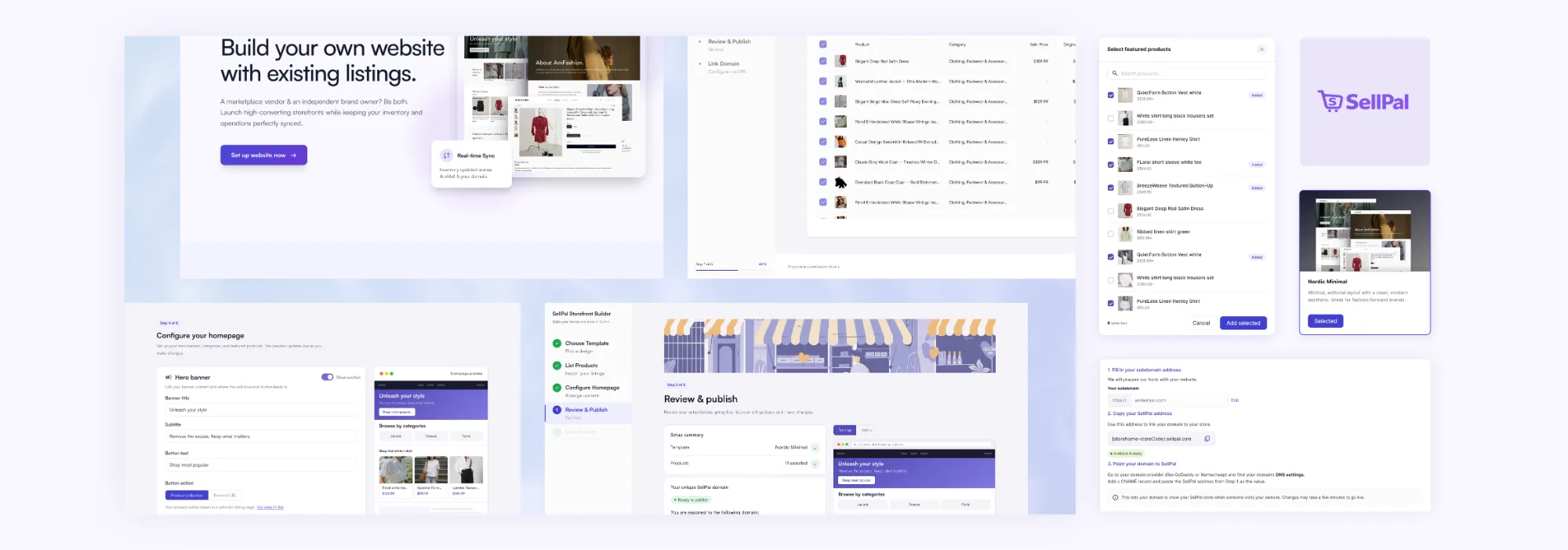
Case 01 / 0→1 · Marketplace SaaS
Building SellPal MVP, a templated direct-to-customer website builder
Giving marketplace sellers a storefront of their own — a templated site builder inside AmMall Seller Center that takes a seller from "no website" to "published, SSL-secured storefront" in about ten minutes, using products they've already listed. Listings and inventory stay synced with the marketplace automatically, so sellers manage one catalogue and one set of orders instead of two.
before the context - solution - impact…
How my three decisions shaped this product
The screens are just output. The decisions about which screens deserved to exist are what made this ship. Below are the decisions that were made by the humans on this team.
Decision 01 — Where the feature should live
I designed SellPal as a product that could eventually stand on its own, then recommended shipping it as a feature that couldn't yet.
Tap to readDecision 01 — Where the feature should live
AmMall had just finished building its marketplace MVP when leadership arrived with a direction but almost no brief: sellers wanted to sell on their own website while also selling on our marketplace. The ask was to build an MVP of a templated site builder tool to test the waters. The tool has its own name: SellPal.
I believed SellPal's potential didn't stop at being a feature for existing marketplace sellers. Sellers who want brand identity or legitimacy could use SellPal — and discover that they could also sell on another marketplace without managing listings separately.
If we were going to hide SellPal as a feature, we'd be accepting that it's destined to stay an additional feature for the marketplace.
Thus I convinced the team to develop SellPal in a way that would allow it to have its own identity and value proposition, which means that it requires not only distinct design theme, but also a use-case landing page, which shows its value without having to configure anything.
This was important because SellPal could turn into a separate product that would complement AmMall Seller Center.
But in reality, we had a short time frame, we only had three engineers available, no extra server space and no extra headcount. Development of a completely separate product wasn't possible for our MVP.
That's why I broke my recommendation down to:
The future: an independent business with an identity, pricing and target audience of its own.
The shippable: the smallest version of that vision that could still test the hypothesis — bringing the same identity into the seller portal as a two-week trial, visible enough to tell us whether sellers valued it and would pay for it.
Skip to solutions to see how I kept brand consistency while giving SellPal the potential to move out in the future.
Tap to flip backDecision 02 — Who gets in the door
I wanted sellers to start building their stores, not get blocked by the work of listing products first.
Tap to readDecision 02 — Who gets in the door
When designing SellPal’s website-building flow, I advocated for allowing sellers to create their own online stores from scratch, even without existing product listings.
My reasoning was that new users could see SellPal presenting a valuable solution for them, and want to quickly build their own storefronts. Making product creation a prerequisite would force users to complete a series of steps that may not align with their immediate goals before they could experience the core value of the website builder. This could increase friction and cause confusion or drop-off before they even started building their stores.
So, I proposed decoupling website creation from product listing, allowing users to enter the building flow first and add product information when needed, rather than introducing unnecessary upfront steps.
Ultimately, to keep the MVP scope manageable and validate demand among existing sellers, the team decided to initially restrict access to AmMall sellers with existing product listings. I aligned with this phased approach while leaving room for a product-creation branch in the design, preserving flexibility to lower the barrier to entry as the product evolves.
Tap to flip backDecision 03 — Where the fragile step belongs
DevOp and design agreed that domain setup was risky. We disagreed on when users should face it.
Tap to readDecision 03 — Where the fragile step belongs
Somewhere in the builder, a seller decides how people reach their site: connect a domain they already own, or use the subdomain we assign them.
Our QA and DevOps lead wanted domain connection as step one, and his premise was correct. DNS propagation is slow, registrar setups vary, and failures often happen for reasons entirely outside our control. His conclusion followed: if it's going to break, break it early, rather than letting someone build a whole storefront and hit a wall at the end.
I agreed with the premise, but reached the opposite conclusion: put it last.
Our sellers come from marketplaces or are selling for the first time. Most don't own a domain, and many have never touched a DNS record. Putting that on the first screen meant asking for the most technical, failure-prone task before they had invested anything in the product.
My hypothesis was simple: we'd create heavy drop-off before sellers ever experienced the value. And drop-off at step one is the worst kind — we never learn whether they actually wanted the product.
More importantly, domain connection wasn't a hard requirement. Sellers could launch immediately on our subdomain with SSL already provisioned. Making a fragile, optional task a prerequisite would add risk without adding value.
The business goal was sellers who publish. The UX goal was a setup with no stalls. Both pointed in the same direction.
The principle I took from it: the more likely a step is to fail, the later it belongs — as long as nothing depends on it.
By the time sellers reached it, they had already built something they wanted to launch, making the friction worth paying.
We shipped domain connection last, then iterated it into an optional post-publish step, where it sits today. Sellers without a domain are pointed toward registrars; those with one can connect it while the excitement of having just launched is still warm.
Tap to flip back01 — Context
A hypothesis leadership wanted tested quickly.
AmMall is an e-commerce marketplace: sellers list products, we handle traffic, payments and support through the Seller Center. Some sellers had started asking for a branded website of their own, and leadership had a hypothesis to test fast:
Marketplace sellers want a direct-to-consumer website they can build quickly and easily, with its listings and inventory connected to the marketplace so there's only one catalogue to manage.
It's an MVP built for a market signal, not best-in-class site building, and a month of scoped work was compressed into two weeks. SellPal had to sit inside Seller Center while standing on its own: same login, same products, same inventory, but its own identity.
02 — Problems and opportunity
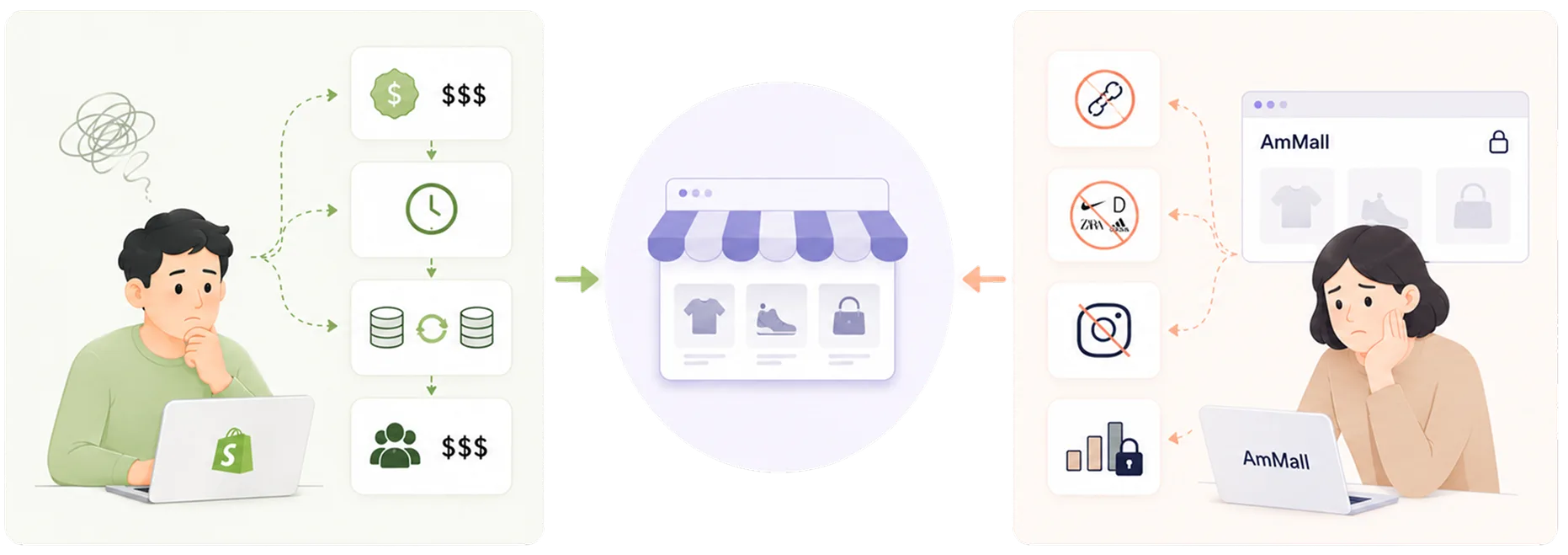
The opportunity sat in the gap between sellers' two website options.
Building a site properly, on Shopify, WooCommerce, or through an agency, means fees, setup time and a second inventory system to sync, too much for a seller doing $20–50k a month with no ops person, and AmMall gets nothing since sales move off-platform. Not building one keeps the seller inside AmMall's chrome with no link for a wholesale buyer or an Instagram bio, capped and more likely to leave for a platform that lets them grow.
SellPal focuses on solving problems that stop sellers from getting more business:
How do we get a seller who has never built a website to a published storefront in one sitting?
03 — Research and insight
Different reasons sellers want a website.
I did not have budget or time for a formal research round. What I had was feedback that came through our seller connections, which I turned into a set of directional personas and pressure-tested with my PM before designing.
Note: these personas are informed guesses, not validated findings; the validation plan I'd run post-launch is at the end of this case study.
| Who | What they actually want | Complexity they'll tolerate |
|---|---|---|
| A · Home textiles Long-tenured seller | Independence. A channel with SEO value and other benefits a marketplace listing doesn't give her | Almost none |
| B · Factory-direct OEM background | Legitimacy. A link to send B2B buyers that isn't a marketplace listing | Almost none |
| C · Outdoor goods 80k TikTok followers | A landing point for off-platform traffic he already has | Medium — wants pixels, wants control |
| D · Niche skincare 40% repeat rate | Customer ownership. Emails, EDM, membership, repeat purchase | High — will outgrow us |
| E · 3C accessories 200+ SKUs, dropship | Nothing. Would open a free one and never touch it | N/A |
Insight 01
This MVP can't serve every seller, so it should be built for the right ones.
The MVP is built for sellers who want something simple and automatically synced with the marketplace, not the ones who need marketing and membership tools we can't support. The north star is sites published, not sites created, which means optimising step 3 to step 4, where sellers were most likely to stall.
Insight 02
Finish publishing is more important than customizing everything in one go.
What kills a small seller's website isn't the builder, it's opening to a blank hero section with no idea what to write, and closing the tab.
So I scoped the MVP around a single question: what has to be true before a site can go live at all? Everything outside that answer moved to after publish, done progressively rather than all at once. The MVP builder only touches the homepage; About and Contact pages auto-generate from the seller's existing store description and contact info, favouring done over perfect, and stay open to editing in a fuller builder down the line.
04 — Needs
Fast to ship vs. good enough to use.
- To finish in one sitting, without homework, a designer, or a domain purchase
- To not maintain two catalogues — products and inventory must stay in sync automatically
- To see the result as they go, not imagine it from a spec
- To be encouraged by easy steps and quick wins, like finishing publishing
- A market signal fast — is this demand real, at what volume, from which seller segments
- Sellers kept inside the AmMall ecosystem, with no path built toward the exit
- To not build a Shopify competitor, because we would lose that fight
- A shippable slice in two weeks that a real engineering team could actually build
I resolved the main conflict of shipping fast vs. usability by cutting features rather than cutting quality, and by designing SellPal as an extension of the AmMall account, same products, same inventory, same operations, surfaced everywhere in the UI. Using AI to quickly mock up prototypes let me confirm scope with leadership early, before committing engineering time. That positioning decision shows up in the copy on the landing page and in the IA.
05 — Solution
Part 1 — Design decisions
Design decisions that made a new feature fit an existing system.
Decision 01
Entry point, promoted to sibling level.
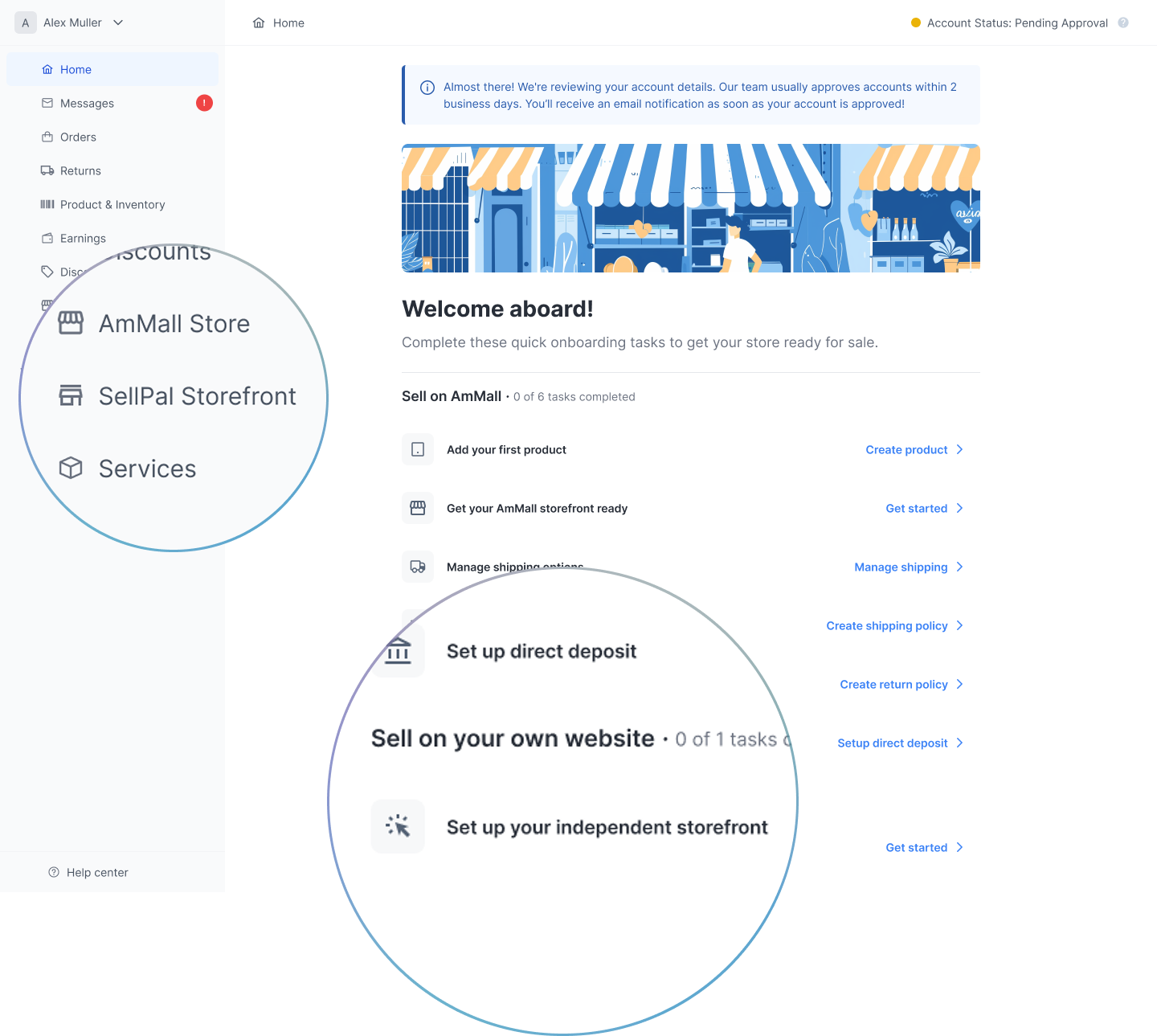
SellPal sits in the sidebar as a peer of "AmMall Store," not buried under it. The seller home checklist splits into Sell on AmMall (0 of 6) and Sell on your own website (0 of 1) — that 6-versus-1 asymmetry signals a separate feature before a seller reads a word.
Decision 02
Connected but distinct.
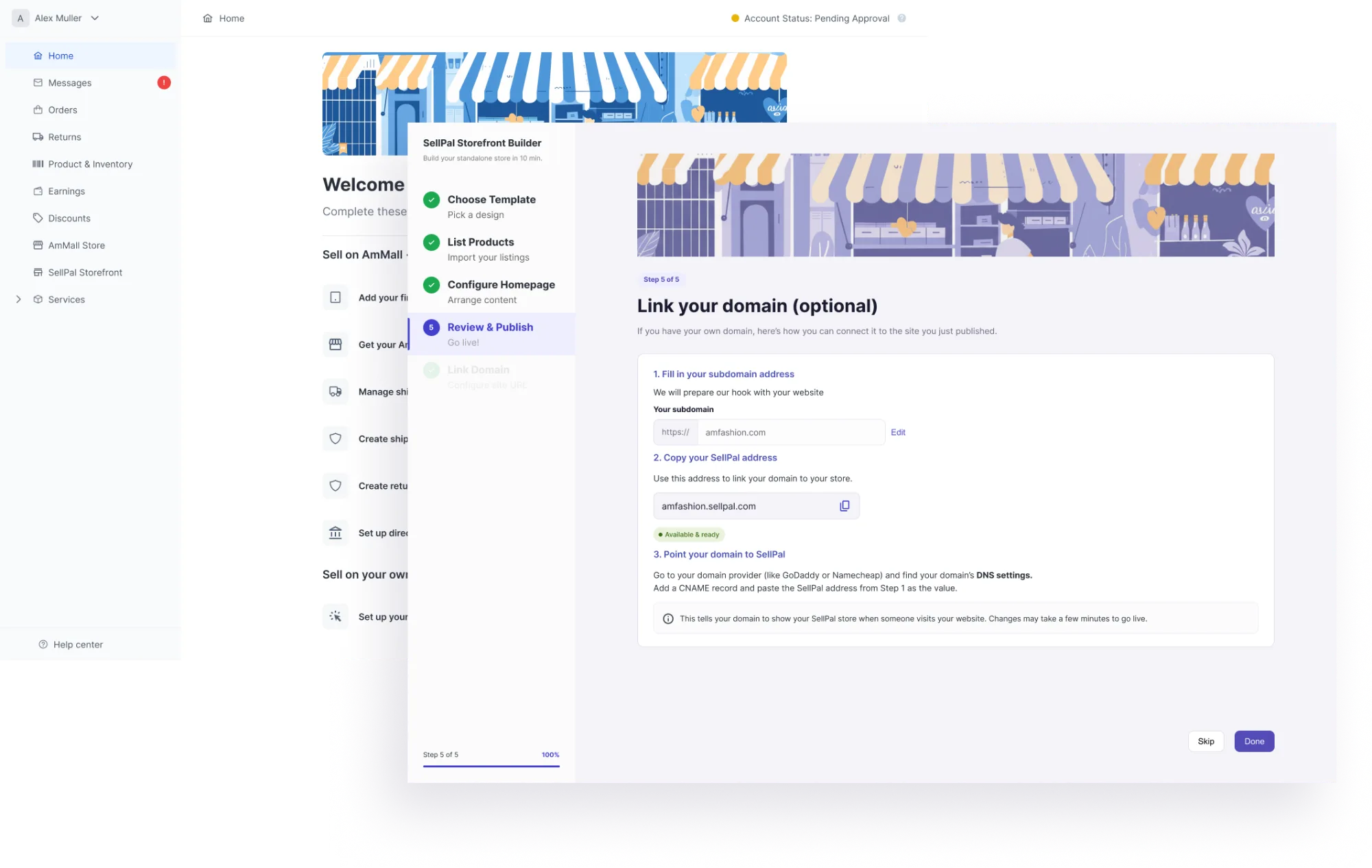
SellPal runs on indigo instead of Seller Center's palette, but keeps the same components and layout — sellers know they're somewhere else, still inside the AmMall ecosystem.
Decision 03
A builder spine that shows the whole path.
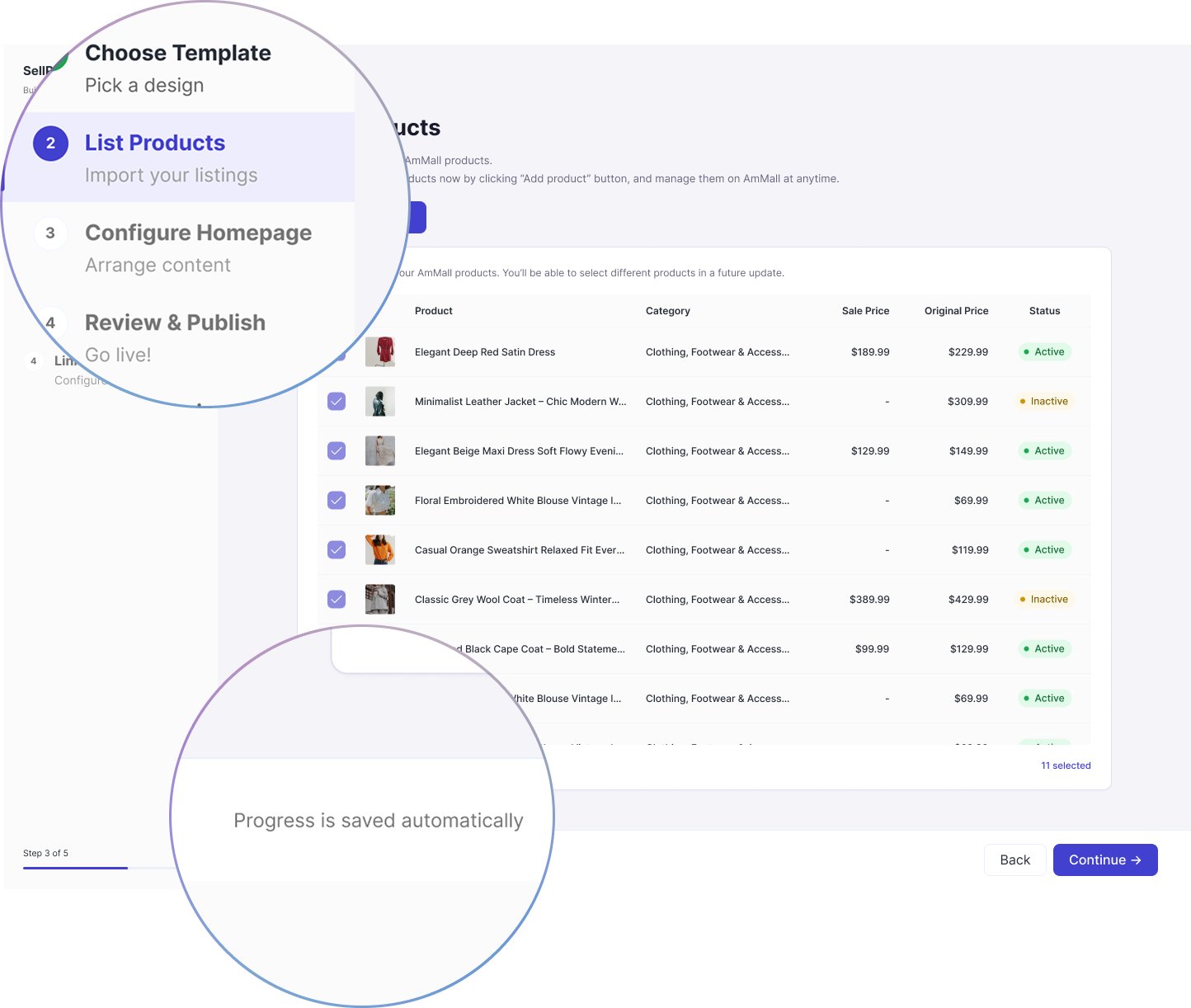
All five steps stay visible in a persistent rail, with "Progress is saved automatically" on every screen — cheap anti-abandonment work for sellers who don't know how long this will take.
Decision 04
A live preview that closes the loop.
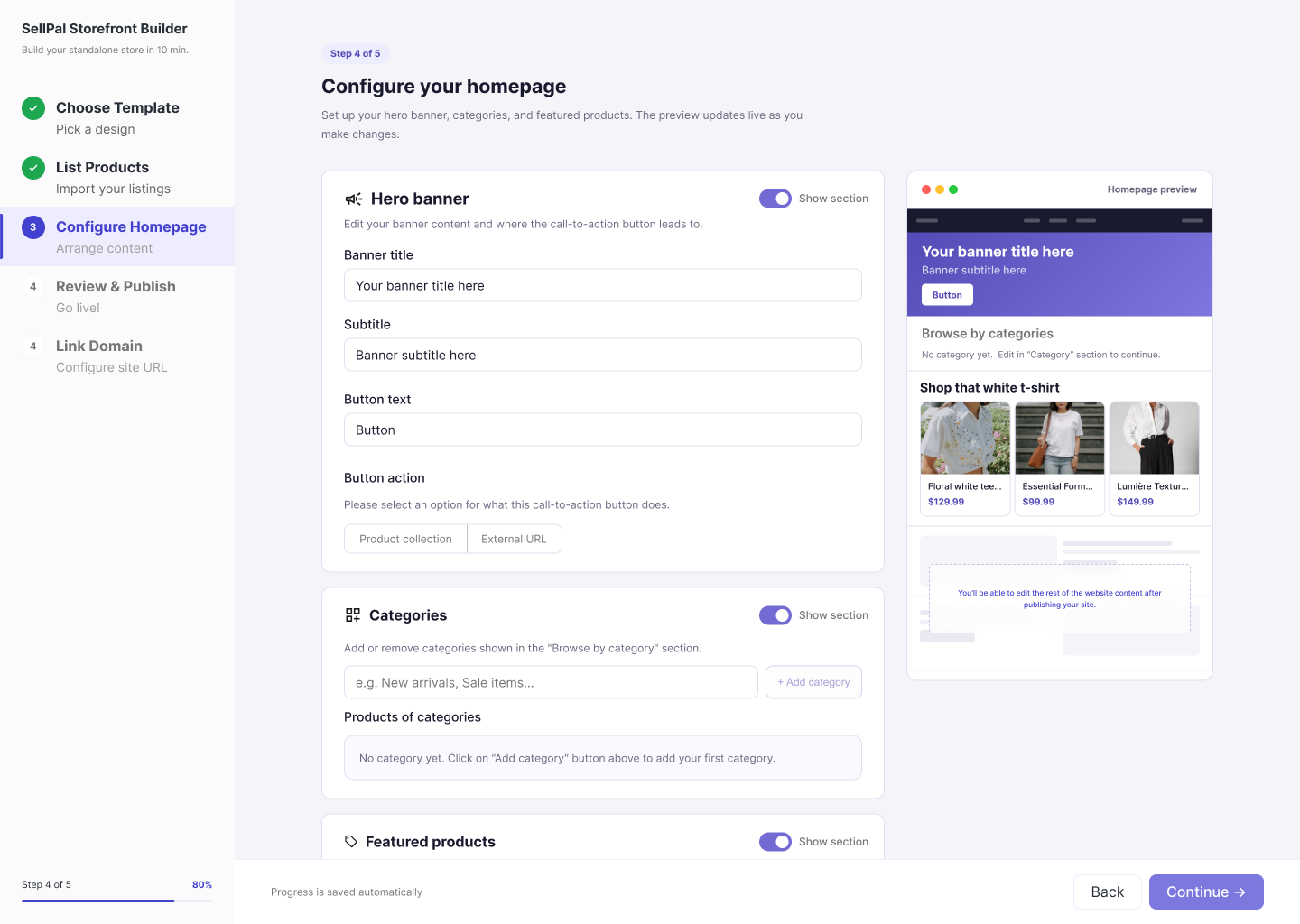
The homepage step pairs the form with a live preview panel, so a seller sees exactly what they're publishing as they type, instead of guessing and checking after the fact.
Part 2 — Walking through the builder
Before getting started · the landing page
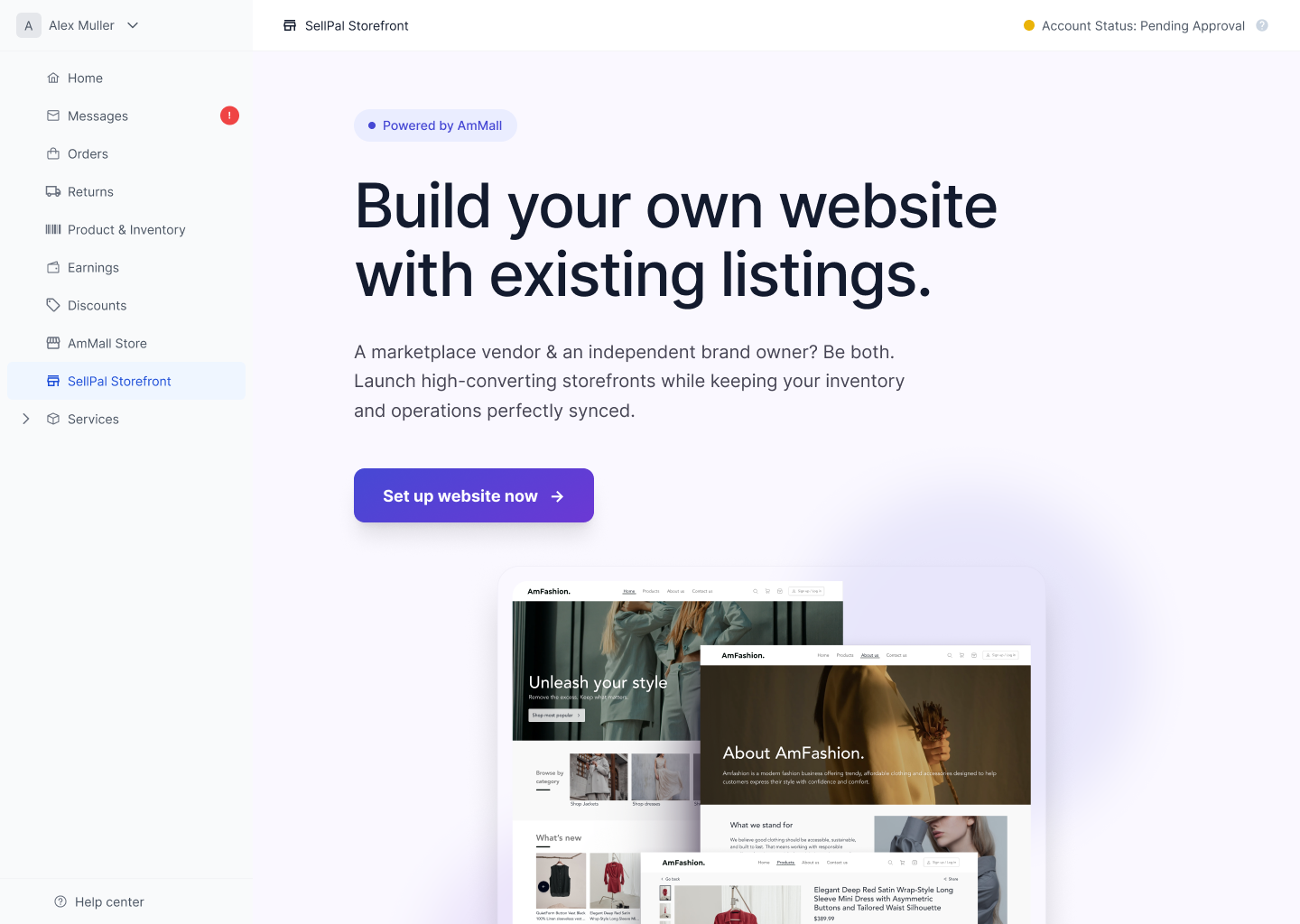
Before a seller ever opens the builder, the landing page has to convince them it's worth the ten minutes. It leads with the one claim a marketplace seller actually cares about, that nothing about their existing operation changes, and only then makes the case against alternatives like Shopify.
Step 1 · Choose a template
To test water, there are two distinct template to choose from. There will be more in the future, but now it functions as a test for seller comprehension of choosing what their store looks like. Content required remains the same for all templates. Users can view full templates to see preview of either sites.
Step 2 · List products
Most sellers are hypothesised to click Add all products, selecting every item they sell on AmMall to also sell on their DTC website, with the freedom of Select products, which opens a modal to curate their listings.
Step 3 · Configure your homepage
The heaviest screen, and the one that decides whether a site gets published. Form on the left, live homepage preview on the right. Three sections, each independently toggleable via Show section: hero banner (title, subtitle, button text, button action), categories, and featured products.
- Visualize preview to reassure sellers. After sellers input content, it shows up right away in the Preview panel on the right, which is both rewarding to see progress and a good way to double-check for errors.
- The empty states give instructions. An unfilled input field tells the user what to write, and when nothing is selected, it instructs what the next step is.
- The placeholder at the bottom of the preview tells the user we’re not editing the other pages of the website yet. Just like good project planning defines what’s in and out of scope, good instructions tell the user what’s excluded for now.
Step 4 · Review & publish
Setup summary with green confirmation ticks, a desktop / mobile preview toggle, and the seller's automatically assigned address — amfashionst382642.sellpal.com — with a Ready to publish status and the note that "SSL is automatically provisioned for SellPal subdomains. Your store will be live immediately after publishing."
Nobody has to buy a domain to publish. Domain purchase is a multi-day, off-platform, costs-money task, and putting it before the publish button would have killed the funnel outright. Actions are Save draft and Publish site, which makes leaving a supported state with a way back in.
Step 5 · Link your domain (optional)
Appears after publishing, with three collapsible sub-steps and both Skip and Done available. Sellers without a domain get a pointer to registrars. Sellers with one can connect it while the excitement of having just launched is still there.
Moving domain linking after publish is the structural version of the whole thesis: never let a hard task block an easy win.
What we cut, and why
| Cut | Why | Where it went |
|---|---|---|
| Custom domain before publish | Multi-day, off-platform, kills the funnel | Optional step 5, after publish |
| Product selection | Import-all is right for most; picker is engineering-expensive | Named in-product as a future update |
| About & Contact page editing | Templates ship with defaults; not launch-blocking | Post-publish editing |
| Free-form layout / reordering | Turns a 10-minute task into a design project | Not planned |
| Templates beyond two | Choice paralysis; each template is real engineering | Post-launch, data-dependent |
| Analytics, EDM, membership | Persona D's needs — out of MVP scope by design | Deliberately not served |
Every cut is the same trade: remove any decision that publishing can happen without.
06 — Process
How this got built in two weeks.
Two weeks with three engineers left no room for a linear design → handoff sequence. Design and build overlapped for almost the entire project, which meant engineering shaped the design as much as the design directed engineering.
- We agreed the definition of done before I opened Figma. PM, engineering and I settled what "shipped" meant on day one — which screens, which states, which behaviours. Doing it once, up front, meant scope stopped being renegotiated every time something turned out to be harder than expected.
- Engineering costed the flow while it was still rough. I walked the leads through the skeleton before any screen was polished, asking one question repeatedly: what here is expensive? A product picker with search and filtering was days of work, so step 2 became import-all with the limitation stated in the UI. Custom domain provisioning was unpredictable, so it moved behind publish. Both of the sharpest scope cuts in this case study came out of that conversation, not out of my own design judgement.
- I designed against what already existed. Before drawing anything I went through the Seller Center library with an engineer to see what could be reused as-is. That's what made the recolour strategy viable — the indigo palette gave SellPal its own identity while the underlying components stayed untouched, so the visual distinctiveness cost close to zero build time.
- I handed over states in the same pass as screens. Empty states, the toggled-off section state, draft vs. published, the pre-publish preview placeholders — all specified alongside the happy path. On a two-week timeline, any state missing from the file gets invented by whoever's implementing it at 6pm, and I'd rather make that decision myself.
- We reviewed in the build, not in the file. Once screens started landing in staging I reviewed there instead of asking for pixel comparisons against Figma. Several small decisions — spacing in the product table, the copy on the amber callout — were made directly with the engineer in front of the running build.
- The full flow was walked end to end together before we called it done — every screen, every state transition, out loud. That session caught inconsistencies no static review would have surfaced.
07 — Reflection
What I'd defend, and what I'd redo.
What I'd defend
Scoping to "what must be true to publish" rather than "what a website needs." It gave me a defensible reason to say no to almost everything, and every deferred feature kept a visible home in the UI instead of quietly disappearing.
Naming limitations in-product. Writing "in a future update" into the interface felt uncomfortable, because it reads at first like admitting weakness. In practice it converts a suspected bug into a stated roadmap.
Refusing to chase persona D. The highest-LTV, most sophisticated seller was the one I argued hardest to exclude. Serving her partially would have doubled the scope and still lost her to Shopify.
What I'd do differently
I under-tested step 3. Two templates and a five-step spine are defensible without research. Whether a seller with no marketing background can write a hero headline needs evidence I never gathered — an unvalidated assumption sitting on the highest-risk screen in the product. Given two more days I'd have run five unmoderated sessions on step 3 alone. Placeholder copy ("Your banner title here") tells a seller where to type while leaving what good looks like unanswered — I'd test real example copy and consider suggested defaults per template.
I designed desktop only. Sellers run these businesses from their phones. The builder is desktop-first for good reasons, but I never made that assumption explicit or checked it.
"10 min" is a promise I never timed. It appears in the sidebar of every builder screen. I should have run a stopwatch through the prototype before committing to it in the UI.
What I'd measure
Sign-ups are the wrong place to look — persona E guarantees that number looks good regardless.
% of sellers who start the builder and reach a live site.
Expected concentration between step 3 and step 4.
Measured against the 10-minute claim in the UI.
% of published sites still live, and % receiving any traffic.
Which personas actually show up, versus which ones I designed for.
Metric 5 is the one that decides the roadmap. If the sellers who show up are mostly persona A and B, the next release is templates and trust signals. If it's persona C, it's pixels and landing-page controls. If it's mostly persona E, the demand hypothesis was wrong and the honest answer is to say so.
What I'd validate first
The personas were directional, and the fastest way to find out where they're wrong is to talk to sellers who have already been through the flow. Questions worth asking, phrased around behaviour rather than intention:
- What did you do with the link after you published it?
- What were you hoping to use this for when you started?
- Where did you get stuck, and what did you do about it?
- What did you expect to be able to edit that you couldn't find?
- If this had asked you to buy a domain first, would you have finished?
Product and seller details in this case study have been generalised.